
0
TV Main Board Replacement: How to Know If You Need One (Samsung & TCL)
Your TV turns on, but it is not working properly. It hangs on the startup logo. It stops seeing your PlayStation. It reboots halfway through a show.
We get emails about this almost every day. And the first thing we tell people is this: do not order a main board yet. We sell replacement main boards. We test every one of them three times before it leaves our Scarborough warehouse. And we would still rather you spend ten minutes diagnosing properly than spend money on a board that was never the problem.
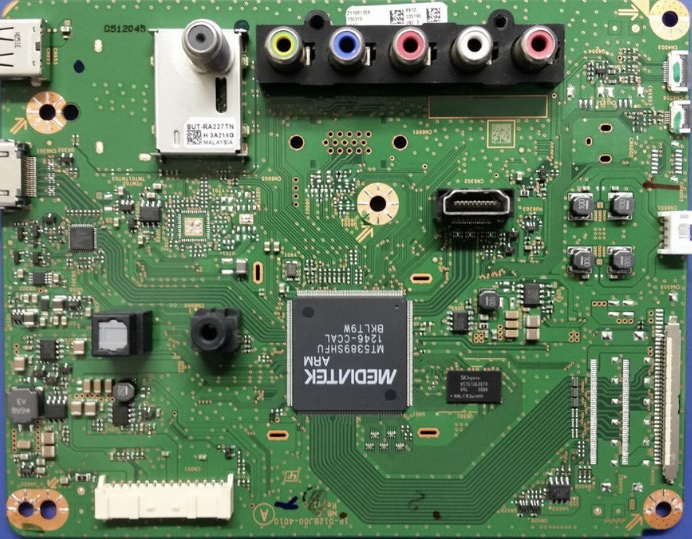
This guide covers what a TV main board actually does, which symptoms genuinely point to it, and the part most people get wrong, how to identify the exact replacement board your television needs.
What a TV Main Board Actually Does
The main board is the brain of the television. On most sets it handles:
- Processing the picture and sound signals
- Managing every HDMI input
- Running the Smart TV operating system
- Wi-Fi and network connectivity
- Talking to the other boards inside the set
Because it touches so many functions, a failing main board can show up in very different ways. That is exactly why it gets misdiagnosed so often. A broken TV does not automatically mean a broken main board. A failing power supply board, a faulty T-Con board, a dying backlight, or plain software corruption can all look identical from the sofa.
This matters for your wallet. Every part we ship is tested and confirmed working. So when a customer tells us a replacement board “did not fix it,” the cause is almost always misdiagnosis, the real fault was somewhere else. Replacing a second main board will not help if the power supply board is the problem. Diagnose first. Order second.
5 Symptoms That Point to a Faulty TV Main Board
1. The TV Is Stuck on the Startup Screen
The logo appears and freezes. Or the set reboots in a loop and never reaches the home menu. Try first: unplug the TV for five minutes, then power it back on. Run a factory reset if you can reach the menu. Check whether a firmware update failed partway. If it still will not boot after that, the main board becomes a strong suspect.
2. HDMI Devices Stop Being Recognised
You plug in the same console you have used for two years and get “No Signal.” Check the cable, the input selection, and the device itself. Then test a different device on a different port. One dead port usually means a port-level fault. Every port dead with multiple working devices points squarely at the main board.
3. Constant Freezing or Random Restarts
One streaming app crashing is normal. A TV that locks up weekly, reboots on its own, or stutters through its own settings menu is not. Update the firmware and power-cycle first. If instability continues, get it looked at.
4. Sound but No Picture
You can hear the show. The screen stays black. This is the symptom people most often misread as a main board fault. It can equally be the backlight, the T-Con board, the display panel, or the power supply board. Quick check: shine a flashlight close to the dark screen. If you can faintly see the picture, your backlight or power supply is the problem, not the main board.
5. No Response to the Remote or Side Buttons
The standby light works, but nothing responds to any input. Once the IR sensor and button panel check out, the main board is often the cause.
The Step Most People Skip: Find Your Part Number
This is the single biggest reason people end up with the wrong board. You cannot order a main board by model number, screen size, or how the board looks. Two 55-inch Samsungs from the same year can use completely different boards. Same TV model, different production run, different part.
Here is how to get it right:
- Remove the back panel of the television (unplug it first).
- Find the main board – it is the board with the HDMI, USB, and network ports attached.
- Read the printed part number directly off the board itself.
- Match that exact number to the listing before you order.
Samsung TV Main Board Replacement
Samsung runs dozens of models per year across multiple hardware revisions. External appearance tells you nothing about what is inside.
Before you consider a Samsung TV main board replacement, rule out the easy stuff:
- If one app freezes and everything else works, it is software.
- If one HDMI device is not detected, test the cable and the source.
- Run Samsung’s built-in self-diagnosis (Settings → Support → Device Care → Self Diagnosis).
- Do a full factory reset if the menu is reachable.
If the fault survives all of that, pull the back panel and get your BN94 or BN97 number.
TCL TV Main Board Replacement
TCL ships with different Smart TV platforms, Roku TV on some models, Google TV on others. The boards are not interchangeable between platforms, even on the same screen size.
Common TCL faults worth checking before you order:
- Home screen will not load → try a factory reset via the recovery method for your platform
- “No Signal” on HDMI → confirm input selection first
- Network dropouts only → test the router before blaming the board
- Boot loop after an update → often firmware, sometimes the board