
0
TV Won’t Turn On After a Power Outage? What to Check Before Replacing a Power Supply Board
The lights come back on after a power outage, the internet router starts up, and everything seems normal, except your television. You press the remote, but the screen stays dark. It is easy to suspect the TV power supply board, especially when the television was working normally before the interruption. But the timing of the problem does not prove that an internal component has failed.
The television may not be receiving power from its outlet, a connected device may not have restarted correctly, or the TV itself may need a normal restart. In other cases, the outage may have coincided with an electrical or hardware fault. Knowing what to observe before arranging a repair can help you explain the problem more clearly and avoid replacing a component unnecessarily.
Why Your TV Won’t Turn On After a Power Outage
A power outage interrupts electricity to your television and other connected devices. When electricity returns, each device may restart differently. Your TV might return to standby mode, while a streaming device or cable box begins its own startup process. If the television switches on but the connected device has not restarted, the screen may show a No Signal message. That situation is different from a television that shows no sign of receiving power at all.
There is also a difference between an outage and a power surge. An outage is a loss of electrical supply; a surge is a brief rise in voltage that can damage electronic equipment. A surge may occur around a power disturbance, but not every outage causes a surge or damages a television. The first useful question is therefore not “Which board failed?” but “What is the television doing now?”
Check What the TV Is Actually Showing You
Pay attention to whether the television responds when you try to turn it on. Perhaps a standby indicator lights up, the manufacturer’s logo appears briefly, or you can hear sound even though the screen looks black. Alternatively, the television may show no visible response. These observations describe different situations and can be useful when you contact a technician. However, none of them confirms a specific failed part on its own.
If the television displays its menus but not the picture from a cable box or gaming console, check whether the external device has restarted and whether the TV is set to the appropriate input. If the television has no response at all, its external power connection and the condition of the outlet are relevant details to establish before considering an internal fault.
Could the Outlet or Power Connection Be the Problem?
Before assuming that the TV power supply has failed, consider the equipment between the television and your home’s electrical supply. A switched-off power bar, an improperly connected power cord, or an outlet that is no longer functioning can prevent a television from turning on. Only check connections that are safely accessible. If the outlet, plug, or cable appears damaged, feels unusually hot, or shows signs of burning, do not use it. Have the problem assessed by a qualified professional.
If your television is connected through a surge protector, remember that the protector itself is another device in the power path. A damaged or worn-out unit may need attention. Samsung’s published troubleshooting guidance includes checking the power connection and using a known-working outlet when a television will not turn on. The appropriate steps may vary with the model and installation.
Try the Manufacturer’s Normal Restart Procedure
If the power connection appears normal and there are no signs of electrical damage, consult the television manufacturer’s instructions for a restart. A normal restart is different from a factory reset. Restarting the television generally does not erase the account information and picture settings you have saved, whereas a factory reset may remove personal settings and require you to set up the TV again.
For example, Samsung describes a soft-reset procedure for supported models that involves briefly disconnecting and reconnecting the TV’s external power connection. Follow the instructions for your specific model rather than assuming that every television uses the same method. If a normal restart does not resolve the problem, repeatedly switching the television on and off is unlikely to provide useful new information. Record what happens and move on to professional support if needed.
When Does the TV Power Supply Board Need Attention?
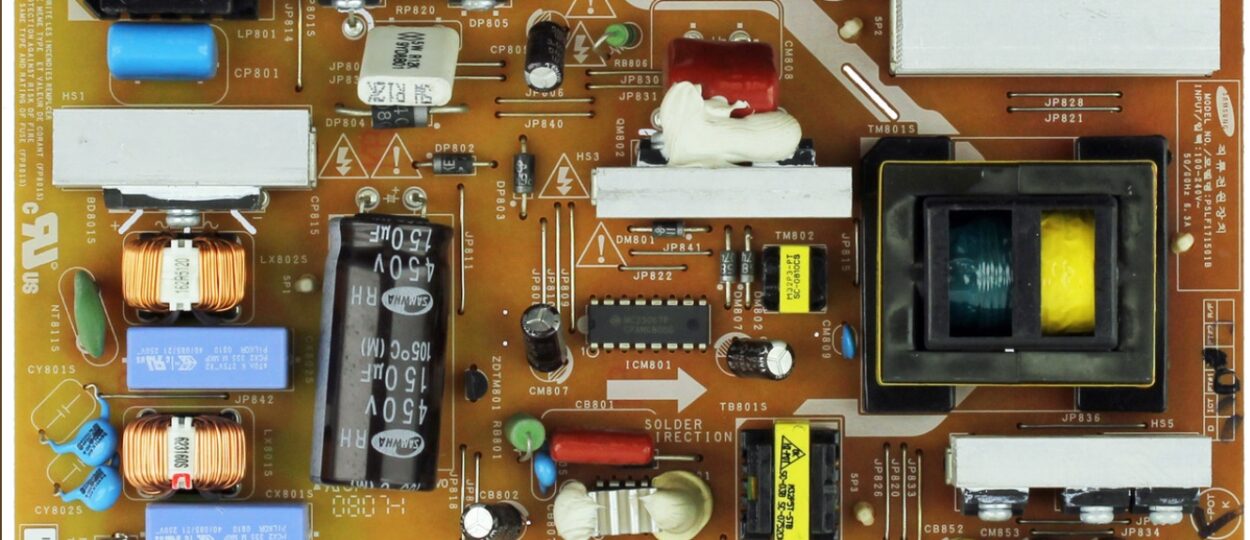
The TV power supply board converts incoming electrical power into outputs used by the television’s internal systems. Because it is involved in supplying power, a technician may investigate it when a TV has a confirmed internal power-related problem. That does not mean the board is responsible whenever a television refuses to start. The fault could involve another internal component, the external power connection, or more than one part of the television. A qualified technician must establish the cause before recommending a repair.
This distinction matters after a power outage because the sequence of events can make one explanation seem obvious. “The power went out, and now the TV will not start” is useful information, but it is not a diagnosis. Television power circuits can retain hazardous electrical energy after disconnection. Internal inspection, testing, and component replacement should be left to a qualified professional.
What About a Samsung or Vizio Television?
The first steps for a television that stops working after an outage depend on its symptoms and the manufacturer’s guidance, not just the brand printed on the front. For a Samsung television, note its full model code and what happens when you attempt a normal restart. If a technician eventually recommends a Samsung TV power supply board, the replacement must be identified for that television’s actual hardware configuration.
The same principle applies to a Vizio television. A technician assessing a suspected Vizio TV power supply problem needs the correct model information and evidence of the fault. Vizio’s published television guidance includes checking the external power connection and a working outlet before seeking further help for a no-power condition. Searching by brand alone will not establish which replacement component, if any, is required.
What Should You Tell a Repair Technician?
A clear description of what happened is more useful than guessing which component needs replacing. Tell the technician when the outage occurred, whether other devices connected to the same outlet are working, and what the television does when you attempt to turn it on.
Mention any visible warning signs or unusual behaviour. If the TV briefly shows a logo or an error message, note what it says rather than repeatedly attempting to reproduce it. Have the television’s full model information and proof of purchase available if you may need manufacturer or warranty support. These details give the technician a starting point for assessing the television without treating a suspected power supply board fault as a confirmed one.
Can You Protect a TV From Future Power Disturbances?
No household accessory can guarantee that a television will never be affected by an electrical disturbance. However, it is useful to understand the difference between an ordinary power strip and a device specifically designed for surge protection. Not every power strip offers surge protection, and surge-protective devices have operating limits. If you use one, follow its manufacturer’s instructions and replace it when its condition or guidance indicates that replacement is necessary. If outages or electrical problems occur frequently in your home, contact your electricity provider or a qualified electrician rather than assuming that the television is the source of the problem.
Final Thoughts
A television that stops working after a power outage does not automatically need a new internal board. Start by identifying what the television is doing, consider whether the external power connection is functioning normally, and follow the manufacturer’s safe restart guidance. If the problem persists, a qualified technician can determine whether it involves the power supply or another part of the television. The fact that a problem appeared after an outage is an important clue but confirming the cause is what makes the next repair decision useful.